
Phone Number Location Tracker
Midgard ProductionParenting
4.1235.00 Reviews
- Version
- 11.0.0
- Installs
- 5.00M
- Age Rating
- Everyone
Screenshots
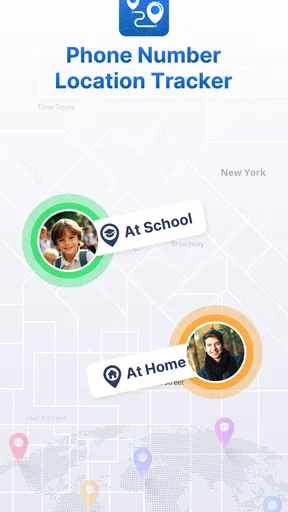
Our Review of Phone Number Location Tracker
 Analysis by Appyee
I think a location tracker is most useful when it helps people coordinate, not when it turns family life into constant checking. Phone Number Location Tracker is aimed at that practical need: its focus is finding a phone’s location and making it easier to check where someone is. That can be reassuring when plans change, but the value depends on more than the map. A phone needs to be reachable, the people involved need to agree on how tracking is used, and expectations should be realistic.
When a live connection matters
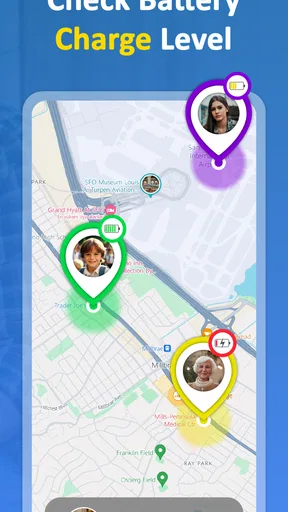
Location tools feel simple when everything is working: someone has a phone, you want to know where it is, and the app gives you a useful answer. The less obvious part is how much the experience depends on the phone being able to communicate. A weak mobile signal, a dead battery or a device that is switched off can turn a quick check into an uncertain one. I would treat a location result as a helpful reference rather than a guarantee that someone is exactly where the marker appears.
That distinction matters for family use. If a teenager is late getting home, a location check may help a parent decide whether to call or wait a little longer. It cannot replace a conversation, and it should not be treated as proof that everything is fine. I find the healthiest approach is to agree on a specific purpose—such as coordinating a pickup—rather than checking someone’s location out of habit.
Useful in real mobile routines
For day-to-day use, the app fits situations where people are moving between familiar places and need a quick way to coordinate. Imagine arranging to meet after school or at a busy public place: checking a location can help you decide which entrance to use or whether to stay put. It is less useful if you expect it to resolve every delay or explain why a person has stopped moving. A map can show a point; it cannot tell you what is happening around that person.
Before relying on it for a family routine, I would discuss who can check the location and when. That small agreement prevents a safety tool from feeling like surveillance. It also gives everyone a shared plan for what to do if the location does not update: call or message first, then use another agreed way to reconnect. This is a more sensible workflow than repeatedly refreshing a screen and reading too much into a stale result.
What to do when the location is unclear
When a result looks wrong or does not appear current, start with the simplest explanation. The phone may have poor reception, location services may be unavailable, or the device may be out of power. Try contacting the person directly and give the device a moment to reconnect before making decisions based on the map. If the person is expected at a particular place, checking with the venue or the other people in the plan may be more useful than continuing to stare at the screen.
This is also why I would not make a tracker the only safety measure for a child’s commute or an older relative’s routine. Keep essential phone numbers accessible, set a clear check-in plan, and decide in advance what counts as a genuine concern. A location app can support that plan, but it cannot replace it. The same caution applies to a lost phone: a tracker may help orient you, while ordinary recovery steps and securing accounts still matter.
Privacy should shape the setup
Location information is personal, so I would keep use narrow and transparent. Explain what is being checked and why, especially with older children and other adults. If the goal is simply to coordinate a specific journey, there may be no reason to keep checking once everyone has arrived. This kind of boundary is not a technical setting; it is a practical way to preserve trust while still getting value from a location tool.
It is also worth thinking about who can access the phone itself. A shared device or an unlocked phone can expose more than the intended location check, so basic device security matters. I would review the app’s access requests during setup and allow only what makes sense for the functions I intend to use. If the permissions or the way tracking is presented do not feel comfortable, pause before adding family members or making it part of a routine.
How it fits alongside other options
Compared with simply calling or texting, a tracker can save time when someone is travelling and cannot answer immediately. Compared with built-in family-location tools on a phone platform, a separate app may appeal to people who want a dedicated place for location checks, but it also means another app to install, understand and keep available. For a one-off meeting, a message with a meeting point may be simpler. For ongoing family coordination, a shared location tool is more useful only if everyone involved understands and accepts the arrangement.
I would skip this kind of app if the real need is emergency response, covert monitoring, or precise accountability at all times. A phone location is not a substitute for emergency services, and tracking someone without their knowledge is not a healthy or appropriate use. It is also a poor fit for anyone who wants a result independent of a phone’s connectivity and settings. The best use case is modest: helping willing family members coordinate ordinary movement.
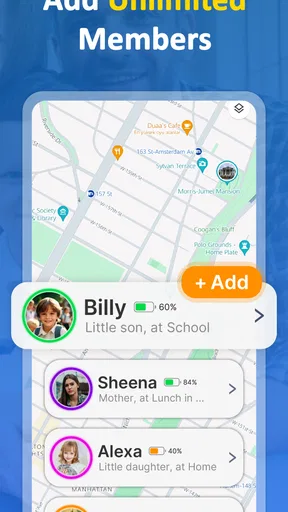
Phone Number Location Tracker is a free parenting app from Midgard Production, with in-app purchases listed from $4.99 to $22.99 per item. It is rated for Everyone, and its current version is 9.0.0. The app has a 4.3 average from around 192,000 ratings, with over a million installs. Those figures suggest that many people have tried it, but they do not tell me whether it will suit a particular family; the deciding factor is whether its approach to sharing location matches your needs and boundaries.
For a parent considering it, I would start with a low-pressure trial of the intended routine rather than presenting tracking as a permanent rule. Agree on a check-in situation, make sure the person carrying the phone knows what is being shared, and see whether the location information actually makes coordination easier. If it adds anxiety or encourages repeated monitoring, a scheduled call or a simple message may be the better choice.
That same practical test applies to adults sharing their location with friends or relatives. A quick check can be useful when someone is travelling alone or when a group is trying to meet, but everyone should be able to say when they are comfortable sharing. The feature is most valuable when it reduces unnecessary calls and uncertainty—not when it creates a new expectation to be watched throughout the day.
There is also a trade-off between convenience and attention. A live map can make coordination feel effortless, yet a person may still need to explain a delay or confirm a change in plans. I would use the location as a prompt for a considerate message, not as a reason to assume the worst or demand an immediate response. That small distinction makes the tool more useful and less intrusive.
If you are comparing options, begin with the task rather than the app category. For finding your own misplaced device, the phone maker’s built-in recovery tools may be the more direct option. For arranging a single meetup, sharing a location temporarily through a messaging tool may involve less setup. If your household wants a standing way to coordinate, a dedicated tracker can make sense, provided everyone is comfortable with the arrangement and understands that connectivity affects what appears.
One useful habit is to decide what a successful check looks like before you need one. For example, you might only want to confirm that a person has reached a familiar destination, rather than follow every part of the trip. A clear goal makes it easier to stop checking once the need is met. It also helps distinguish a normal delay from a situation that genuinely calls for direct contact.
Getting Started with Ease
Right off the bat, downloading and setting up the Phone Number Location Tracker is a breeze. Available for both Android and iOS, you can grab it from the respective app stores. Once installed, you’re greeted with a clean and intuitive interface. No frills, no fuss—just a straightforward dashboard that even the most tech-challenged among us can navigate without breaking a sweat.
Features That Stand Out
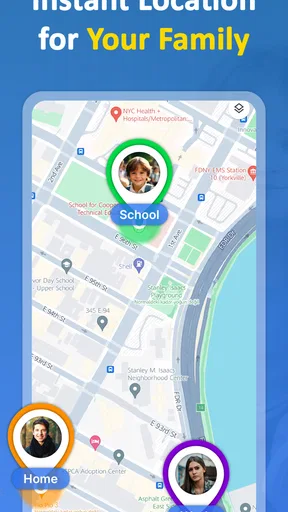
The app isn’t just about tracking a phone number’s location; it’s packed with a few other handy features. First up, there’s the real-time GPS tracking. You can enter a phone number, and the app attempts to fetch the device’s current location. It’s surprisingly accurate, which is a huge plus. I tested it with a couple of friends (with their permission, of course), and it pinpointed their locations down to the street level.
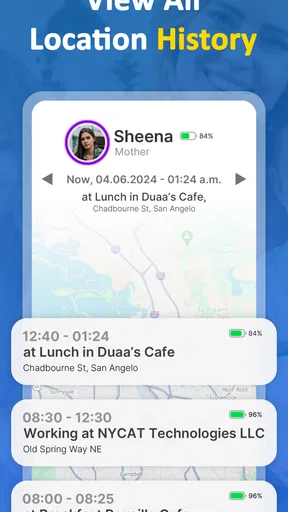
Another cool feature is the location history. This lets you see the past locations of the device, which can be super helpful if you’re trying to retrace steps or figure out a pattern. The app also offers an address lookup feature, where you can get more detailed information about a specific location.
Privacy Concerns and Permissions
Now, let’s talk about privacy. A lot of people are understandably concerned about apps that track location, and with valid reason. The app does require a fair bit of permissions, including access to your contacts and location data. Rest assured, the app claims to adhere to all necessary privacy regulations and only shares data with your explicit consent. Still, it’s always good to be cautious and only use such tools ethically.
Practical Uses and Limitations
So, when would you actually use this app? Well, it’s perfect for those times when you’ve misplaced your phone or want to check on a friend’s safety. Parents might find it useful for keeping tabs on their kids, especially teenagers who are just starting to explore the world independently.
However, it’s not without its limitations. The app relies heavily on the availability of GPS and mobile network signals. In areas with poor connectivity, the accuracy can drop significantly. Plus, it’s worth noting that the app cannot track a phone number if the device is turned off or in airplane mode.
Final Thoughts
Overall, the app is a solid option for those who need a way to check a phone’s whereabouts. It’s simple, effective, and gets the job done without too much hassle. Just remember to use it responsibly, respecting privacy and permissions.
If you’re curious to try it out, you can download the app from the Google Play Store or the Apple App Store. It’s free to use, with some in-app purchases if you want to unlock additional features. Happy tracking!
My connectivity verdict
I see this as a convenience for consensual family coordination, not a dependable safety guarantee. Its usefulness rises when the phone has a working connection and the people involved have agreed on a sensible routine; it falls when the signal is weak or expectations are unrealistic. For readers comfortable with those limits, it can be worth trying. If you need certainty, prefer a no-setup one-off meeting arrangement, or are uncomfortable sharing location, calling or messaging is the better fit.
Privacy and Permissions
See what permissions an app requests and how it handles your data.
- Location
- approximate location (network-based), precise location (GPS and network-based)
- Photos/Media/Files
- read the contents of your USB storage, modify or delete the contents of your USB storage
- Storage
- read the contents of your USB storage, modify or delete the contents of your USB storage
- Other
- view network connections, full network access, run at startup, control vibration, prevent device from sleeping
Verdict
Strengths of Phone Number Location Tracker
- Easy to use interface for quick navigation.
- Real-time location updates are accurate.
- No registration needed for basic features.
- Lightweight app with minimal storage use.
- Supports multiple languages for global users.
Limitations of Phone Number Location Tracker
- In-app ads can be intrusive at times.
- Limited features available in free version.
- Requires internet for accurate tracking.
- Battery drain noticeable during extended use.
- User data privacy concerns may arise.
Similar Picks in This Category
View All
Family Space
Motorola Mobility LLC.3.9

شرطة الأطفال - مكالمة وهمية
Oub Apps4.1

Findmykids: Parental Control
LETEM LTD4.6

Pregnancy + | Tracker App
Philips Electronics UK Limited4.8

Policía de niños - para padres
Kids police4.7

Pregnancy App
Amila4.9
Frequently Asked Questions
What features does the Phone Number Location Tracker offer?
The Phone Number Location Tracker provides real-time tracking of phone numbers on a map, displaying the current location and movement history. Users can also access details like the network provider and location accuracy. The app supports both domestic and international numbers, making it versatile and useful for various tracking needs.
Is the Phone Number Location Tracker app secure and private?
Yes, the app is designed with user privacy in mind. It requires user consent for tracking and does not store personal data on external servers. All location information is encrypted to ensure that only authorized users can access it. It's important to review the app's privacy policy to understand data handling practices.
How accurate is the location data provided by the app?
The accuracy of location data can vary based on several factors, including the phone's GPS settings, network provider, and environmental conditions. Generally, the app provides a high level of accuracy, often within a few meters. Users can improve accuracy by ensuring their device's location services are enabled and up-to-date.
Does the app work globally, and are there any restrictions?
The Phone Number Location Tracker is designed to work globally, supporting tracking for both domestic and international numbers. However, certain countries may have restrictions based on local laws and regulations regarding privacy and tracking. Users should ensure compliance with local laws before using the app across different regions.
What are the potential costs associated with using the app?
While the app may be available for free download, there could be in-app purchases or subscription fees for advanced features. Additionally, data charges may apply based on your mobile plan, especially when using location services or accessing maps. It's advisable to review the app's pricing details on the download page for a comprehensive understanding.
